Compare
Termany vs iTerm2
iTerm2 has been the power-user terminal on macOS for years: splits, profiles, triggers, shell integration, and deep tmux support. Termany keeps the splits and adds what agent-heavy work needs — session status, reusable Bots, and review panes beside every agent.
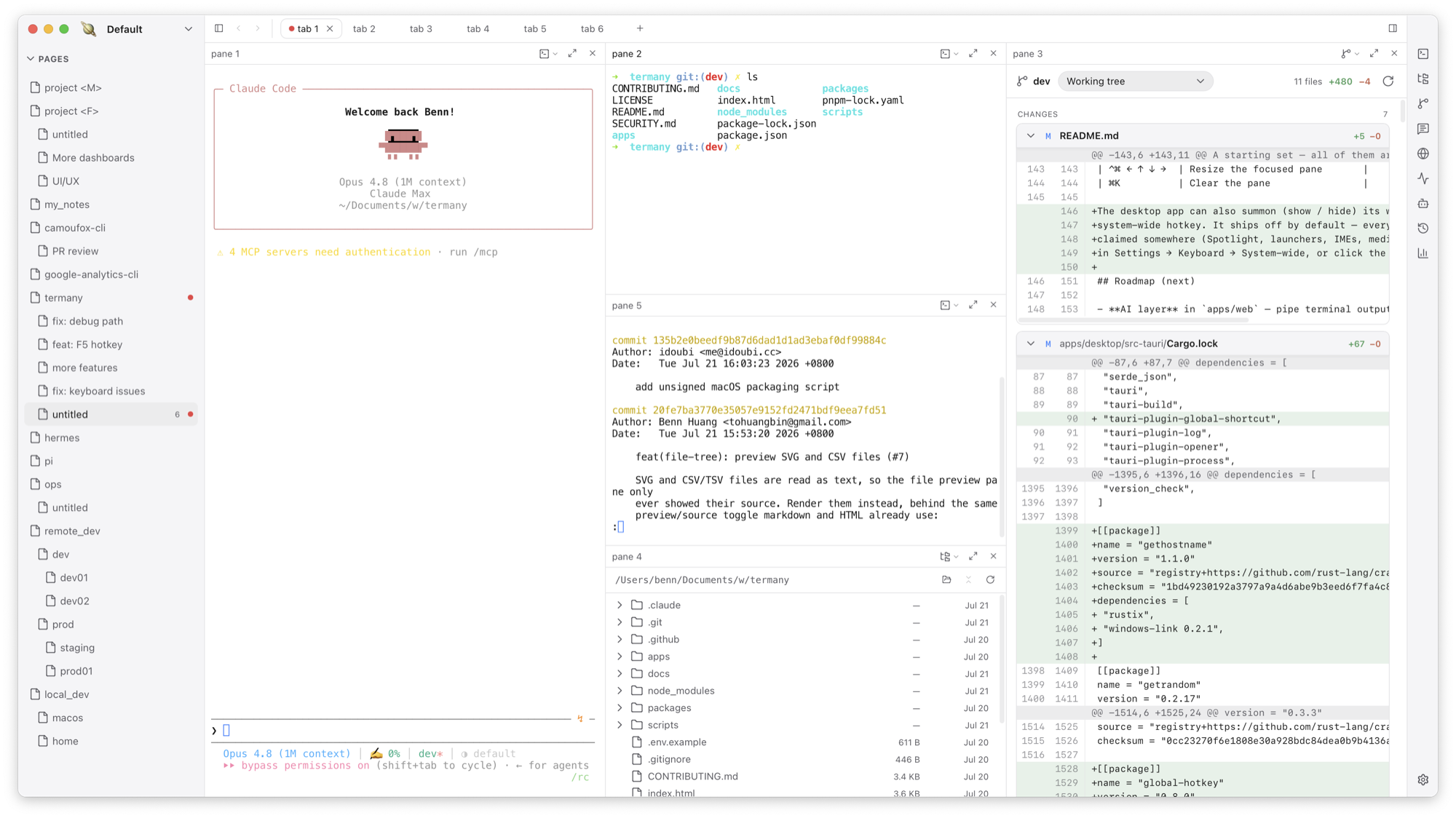
Splits are the start, not the workflow
Both apps split panes. Termany adds structure on top: workspaces for each context, pages for each project, tabs for each shell, and panes that keep running and keep their scrollback while backgrounded. ⌘P jumps to any page, tab, or pane by name.
Know which agent stopped
iTerm2 can alert you with triggers you configure yourself. Termany tags every pane working, done, or needs attention out of the box — even for agents that draw their own TUI — and lists them in an ACTIVE section above the page tree.
Review without leaving the terminal
Press ⌘E to turn any pane into a file tree with an editor and inline previews, a Git diff of staged, unstaged, and untracked changes, a conversation pane, or a browser.
Beyond the Mac
iTerm2 is macOS-only. Termany ships for macOS, Windows, and Linux, with the same UI also running as a web app.
| Capability | Termany | iTerm2 |
|---|---|---|
| Platforms | macOS, Windows, Linux | macOS only |
| License | Open source, AGPL-3.0 | Open source, GPL |
| Layout model | Workspace → page → tab → pane | Windows, tabs, split panes |
| Agent status tags | Built in, with ACTIVE list | Configure triggers yourself |
| Built-in coding agents | 11 launchable from the side rail | None; optional AI plugin |
| File tree, editor, previews | In any pane | No |
| Git diff pane | Yes | No |
| tmux integration | Run tmux inside a pane | Native tmux -CC integration |
| Themes | 18 that restyle the whole window | Color presets and profiles |
Choose Termany if
- Your day is several coding agents working on the same repositories
- You want a file tree, diff, and browser next to the terminal instead of a separate app
- You need the same terminal on Windows or Linux too
- You want per-pane SSH and agent cost tracking in one place
Choose iTerm2 if
- You depend on iTerm2’s native tmux -CC integration
- You have years of profiles, triggers, and scripts tuned for iTerm2
- You want a mature, Mac-only terminal and do not run agents in parallel
Frequently asked questions
Can I import my iTerm2 settings into Termany?
Termany has its own themes and keybindings rather than an iTerm2 importer. All ~60 actions are rebindable in Settings → Keyboard.
Can I run tmux inside Termany?
Yes. Any pane is a normal shell, so tmux, screen, or any CLI works inside it.
Is Termany macOS-only like iTerm2?
No. Termany has builds for macOS, Windows, and Linux.